Posts

Showing posts with the label download

Project Dumbledore - How to download YouTube Playlist on your system

Image
As, I was going through some great lectures available on YouTube, I thought of saving them all in a playlist and then downloading them all for offline viewing on my system. After googling for few minutes, I found this great command line program youtube-dl  to achieve this. It ticks all the right boxes - simple, open source, platform independent and python based. To install this on Ubuntu based systems, run the following command on your terminal: sudo apt-get install youtube-dl To download YouTube playlist, run the following command: youtube-dl -ctik   https://www.youtube.com/playlist?list=XXXXXX It has many other great features, be sure to explore them all. Though, I have found a problem that it downloads video and audio files separately and then combines them together in a single file leaving two extra files after each download which needs to be removed after the download is complete. I haven't looked into it to find the issue. If I find the solution, I will ...
Project Valentino - How to download Permanent Room Roommates Season 2 Episode 1 from TVFplay.com

Image
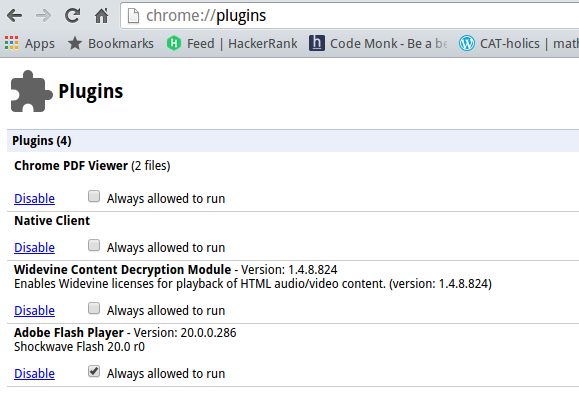
So, I was down with stomach bug and decided to spend my Valentine's Day morning watching the new episode of Permanent Roommates Season 2 on their website TVFplay.com . But sadly, they were not using Youtube Player embedded in their site (as they repeatedly proclaimed in their last videos about doing so) and my net speed is not that much to view it smoothly without any buffering or interruptions. So, I decided to download the video on my desktop for my viewing pleasure later on. First, I decided to inspect their webpage and found out that they were using brightcove player (and also that they are using angularjs. Thumbs up for that). So, after googling a bit, I found out that on following the given below steps, one can easily download videos off a brightcove player: 1. Open Google chrome and in address bar, enter chrome://plugins/ 2. Disable the Adobe Flash Player Plugin. 3.  Go to TVFPlay.com. Before starting the episode, click on your right mouse button. Go to Netwo...