Posts

Showing posts with the label network

Project Wild Penguin 20.4.2017: Wifi Connection Bug in Xubuntu 17.04

After updating my Xubuntu to latest version 17.04, I've found out that my wifi was disabled. No wifi connections were being shown in the indicator plugin. On googling, I've found out that there is a bug in the latest release. So to fix the bug, I followed the steps mentioned in one of the solutions provided by the good folks at askubuntu.com. The steps given were as follow: Open terminal and run: sudo vim /etc/NetworkManager/NetworkManager.conf   At the bottom of the file, copy and paste the following: [device] wifi.scan-rand-mac-address=no     Then just save and close the file and run: sudo service network-manager restart Check if Wifi is enabled or not. If it is still not enabled, go to Softwares & Updates > Additional Drivers > Click on Do not use the device under Broadcom Wireless Drivers as shown in the image below.      5. Click on Apply Changes and then restart the system, the Wifi should be enabled now. Hope...
Project Valentino - How to download Permanent Room Roommates Season 2 Episode 1 from TVFplay.com

Image
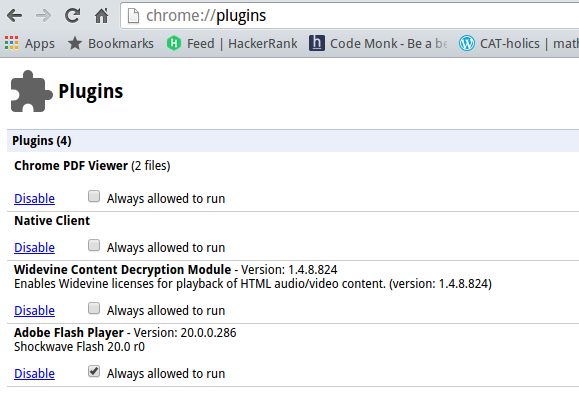
So, I was down with stomach bug and decided to spend my Valentine's Day morning watching the new episode of Permanent Roommates Season 2 on their website TVFplay.com . But sadly, they were not using Youtube Player embedded in their site (as they repeatedly proclaimed in their last videos about doing so) and my net speed is not that much to view it smoothly without any buffering or interruptions. So, I decided to download the video on my desktop for my viewing pleasure later on. First, I decided to inspect their webpage and found out that they were using brightcove player (and also that they are using angularjs. Thumbs up for that). So, after googling a bit, I found out that on following the given below steps, one can easily download videos off a brightcove player: 1. Open Google chrome and in address bar, enter chrome://plugins/ 2. Disable the Adobe Flash Player Plugin. 3.  Go to TVFPlay.com. Before starting the episode, click on your right mouse button. Go to Netwo...